


Introduction
In the ever-evolving landscape of device test and validation, engineers continually seek innovative ways to enhance efficiency, reduce costs, and adapt to dynamic project demands. One powerful solution to enable streamlined multi-instrument testing is the integration of Multi-instrument Mode for Moku:Pro with LabVIEW, a combination that redefines the capabilities of hardware instrumentation to fit the needs of a modern, digital-first test approach.
Automated multi-instrument test platform utilization
Multi-instrument Mode allows the efficient division of FPGA resources into multiple slots, enabling the seamless deployment of up to four instruments concurrently (Figure 1). This scalability streamlines hardware resources while opening the doors to complex testing scenarios that were previously unattainable with standalone instruments. When transitioning from manual to automated testing, software-defined instrumentation bridges the gap between an intuitive user interface for manual intervention and powerful APIs to fully automate repetitive testing and device validation.
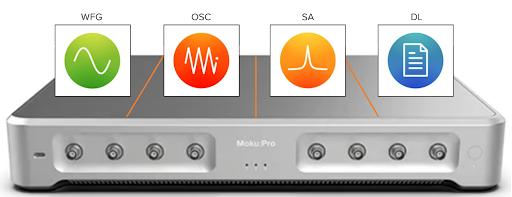
Figure 1: n Multi-instrument Mode, Moku:Pro can deploy the Waveform Generator, Oscilloscope, Spectrum Analyzer, and Data Logger simultaneously to enable real-time signal generation, time-domain analysis, frequency-domain analysis, and data capture.
Implementing the test system via LabVIEW
By utilizing LabVIEW, a common test and measurement programming environment, we can generate, monitor, and control multiple instruments simultaneously while providing real-time access to critical results. Within Multi-instrument Mode, signal routing between instruments occurs internally within the FPGA, ensuring lossless interconnections. In the event that you have a more complex setup with a number of instrument inputs and outputs routing to the analog inputs and outputs, all signal routing can still be done internally. These interconnections can be arbitrarily routed between inputs, outputs, and instruments.
In our custom LabVIEW setup (Figure 2), we explore how Multi-instrument Mode seamlessly integrates the software-defined Waveform Generator, Oscilloscope, Spectrum Analyzer, and Data Logger instruments for Moku:Pro. The Waveform Generator generates a test signal, which is routed to the Oscilloscope for time-domain analysis, and simultaneously, the Spectrum Analyzer provides a frequency-domain perspective. The Data Logger efficiently records data for analysis and documentation.

Figure 2: Custom LabVIEW graphical user interface (GUI) to display multiple instrument results in real time.
To enhance hands-free validation, configurable thresholds allow for the adjustment of test limits. These thresholds, applied to data from the Oscilloscope and Spectrum Analyzer in real time, trigger alarms when exceeded, simplifying pass/fail qualification.
Our LabVIEW block diagram in Figure 3 reveals a straightforward process: configuring Multi-Instrument Mode, individual instrument slots, and parallel code blocks to monitor and control the four Moku instruments. This approach eliminates the need for additional instrumentation, making it a cost-effective and resource-efficient solution.

Figure 3: LabVIEW block diagram to control multiple Moku:Pro instruments.
The key components
- This block permits real-time configuration of the test signal’s amplitude and frequency. The generated signal feeds into the Oscilloscope, Spectrum Analyzer, and Data Logger.
The Oscilloscope
- Configure alarms and thresholds for the time-domain display, including voltage thresholds to detect overvoltage events, all while monitoring the signal in real time.
- Customize alarms and thresholds for the frequency-domain display, including frequency thresholds for event detection, with real-time signal monitoring.
The Data Logger
- Configure parameters for display and set the system to stop logging data if both alarms are triggered.
This configuration enables a custom test system on a single device, ideal for automated device validation requiring multiple test instruments. By utilizing software-defined instrument platforms, you can run multiple instruments simultaneously, and you can generate, view, and process signals simultaneously through common automation tools such as LabVIEW. Making real-time, custom measurements with highly reconfigurable hardware means your system can evolve with you — it’s easy to adapt it to your needs as test requirements inevitably change. With additional real-time data processing, you can evaluate against test metrics and provide decision points for controlling hardware, updating output signals, or modifying your test sequence, all with one device.
The integration of Multi-instrumen Mode and LabVIEW empowers you to create a customized test system on a single device, perfect for automated device validation requiring multiple test instruments. Leveraging software-defined instrumentation, you can run multiple instruments concurrently; generate, view, and process signals simultaneously; and adapt your systems as testing requirements evolve. With real-time data processing, you gain the ability to evaluate against test metrics and make informed decisions, all with the convenience of a single device.
To see this example explained in more detail, check out our on-demand webinar with Electronic Design (Figure 4).

Figure 4: Check out Software-defined test: An easier way to automate and validate — a webinar we co-hosted with Electronic Design — to learn more.
Want to learn more about our LabVIEW API? Click here. To learn more about the benefits of software-defined instrumentation for automated test, click here. If you have questions, you can also contact us at support@liquidinstruments.com.